App Store screenshot resizer
Drop screenshots of any size and get them at the exact pixel sizes App Store Connect and Google Play accept. Free, in your browser, without a watermark.
Drop or paste screenshots here
- Exact pixelsEvery file comes out at a size the store accepts, to the pixel.
- No alpha channelPNGs are saved as 24-bit RGB, which both stores want, or pick JPEG.
- Landscape stays landscapeA sideways screenshot gets the store's landscape size.
- PrivateRead and resized in your browser. Nothing is uploaded.
Every size and its rules: App Store screenshot sizes · Google Play screenshot sizes
Questions
How do I resize screenshots for the App Store?
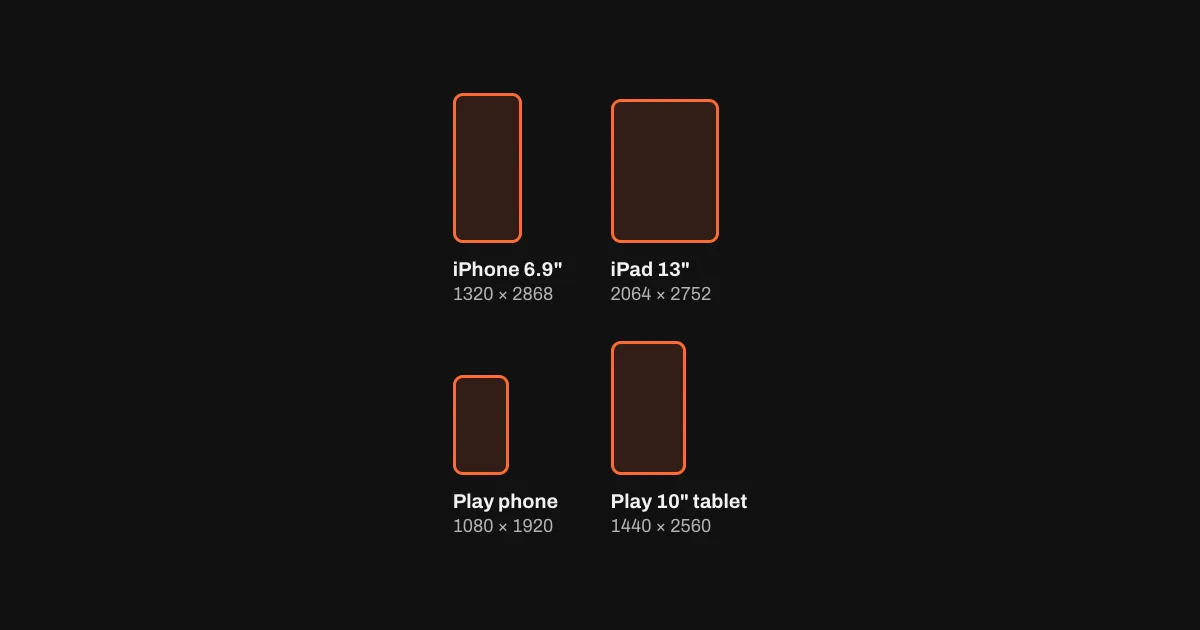
Drop them above and pick the sizes. Each one comes out at a size App Store Connect accepts, to the pixel, as PNG without an alpha channel or as JPEG. One iPhone 6.9" set (1320 × 2868) covers every iPhone, and iPad 13" (2064 × 2752) every iPad.
Should I crop or fit?
Crop fills the new size and trims what sticks out, evenly from both ends. Fit keeps the whole screenshot and fills the rest with the colour at its edges, or with white or black. A screenshot from a device of the same shape loses almost nothing to cropping; a much taller one loses more, so fit may suit it better.
Why does App Store Connect reject my screenshots?
Mostly for a pixel size it doesn't accept or a PNG with an alpha channel; many design tools save PNGs with one even when nothing is transparent. The resizer avoids both. To see what's wrong with a file you already have, drop it into the checker on App Store screenshot sizes.
Does it make Google Play sizes too?
Yes: 1080 × 1920 for phones and the 7" and 10" tablet sizes, as 24-bit PNG or JPEG, which Google Play requires. Landscape screenshots get the landscape size.
Is it free? Are my screenshots uploaded?
Free, without an account or a watermark. Nothing is uploaded: the screenshots are read and resized in your browser.