App Store search preview
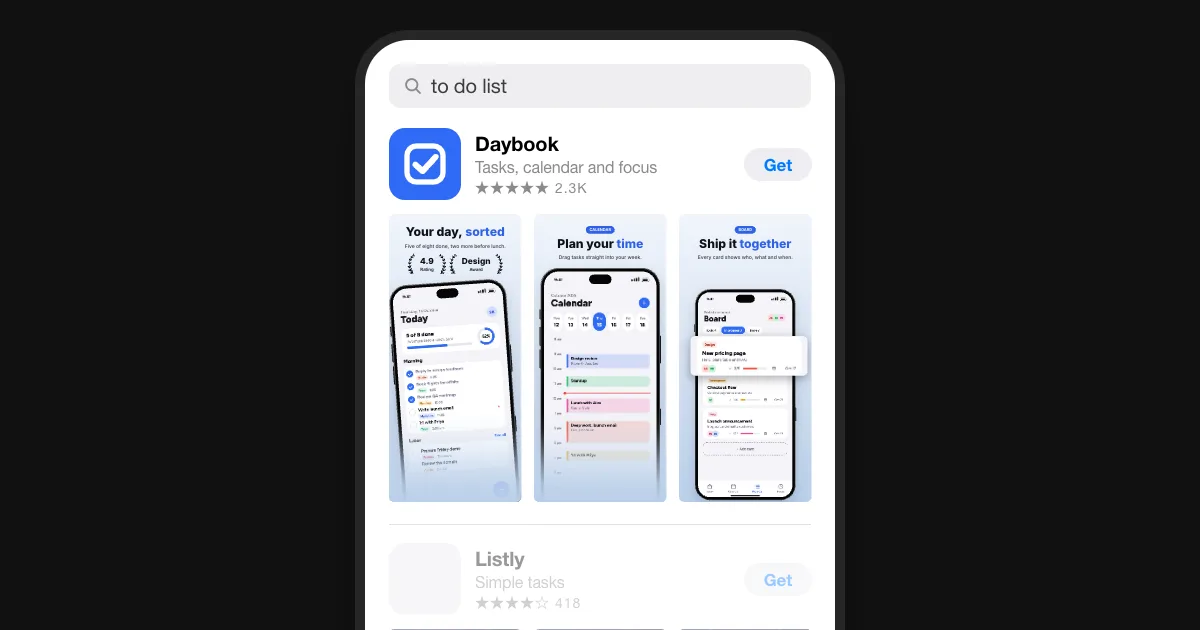
Paste your App Store link and see your app the way people meet it: as a search result, above the apps they find with the same search. Then drop in new screenshots to see if they would stand out.
What a search result shows
- The first three screenshotsUpright ones sit side by side, each 111 points wide on an iPhone. A landscape first screenshot fills the row alone, 350 points wide.
- Name, subtitle, ratingNext to the icon: the name and subtitle, up to 30 characters each, then the stars and how many people rated.
- A video firstWith an app preview, the video plays without sound in place of the first screenshot.
- Light and darkIn dark mode the result sits on black: a white screenshot glows, a dark one can disappear.
What to check
- Read it at this sizeIf a headline needs zooming, cut words before you shrink the type.
- Lead with the pointThe first screenshot says what the app does for people, not just what its home screen looks like.
- Look differentScreenshots in the colours of every other result blend in. Pick a look the search doesn't have yet.
What each of the three should do: the first three screenshots · Sizes and rules for every device: App Store screenshot sizes · A page per search: Custom Product Pages
Questions
How do I see how my app looks in App Store search?
Paste your App Store link above, or type the app's name. The preview loads your icon, name, rating and screenshots from Apple and shows them as a search result, with the apps the same search finds below yours.
Where do the other results come from?
From Apple's public search API, for the term and country you choose. The App Store app ranks results with more signals, so its order can differ from the one shown here.
Why does it show my category instead of my subtitle?
Apple's public data has no subtitles. Type yours (up to 30 characters) into Your subtitle to see it in the result; the other apps show their category in that line.
Can I try new screenshots before I upload them?
Yes. Drop up to three, or one landscape, and they take the place of your live ones in the preview. They stay in your browser; nothing is uploaded. No app in the store yet? Drop them without a link.
Does it work for Google Play?
Not here: Google Play has no public search a browser can ask. The store preview in the editor shows your set in a Google Play listing.
Is it free?
Free, without an account. Your browser asks Apple directly, so the search never passes through Storeglow.