Localized App Store screenshots
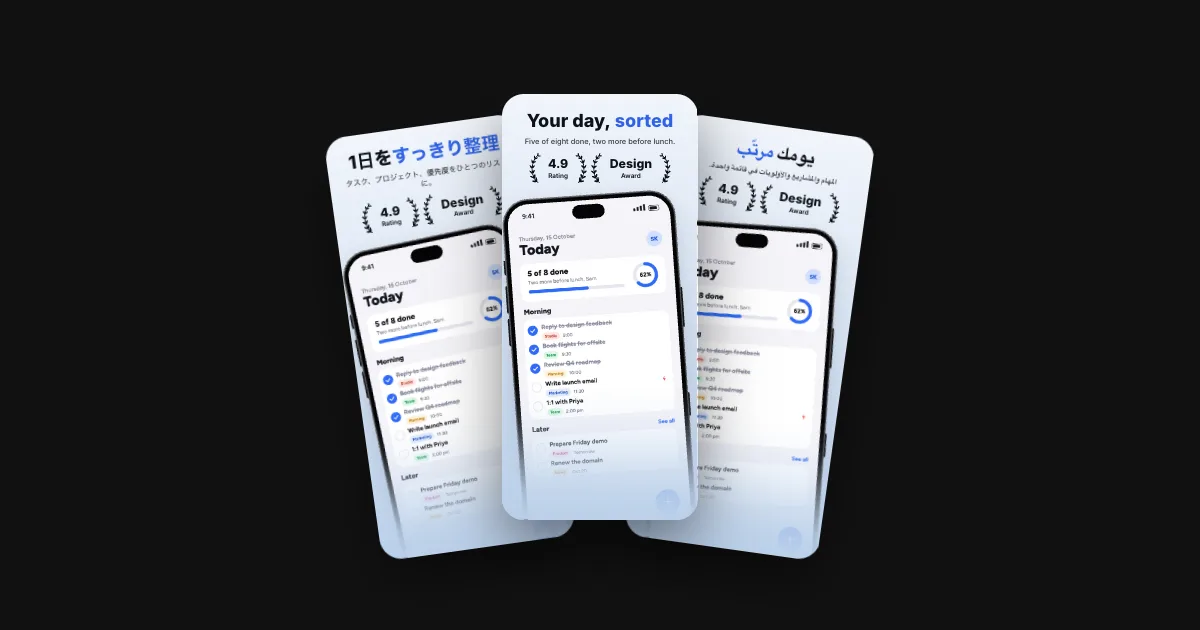
39 languages from one design, right to left included. Pick a language: captions, line breaks and alignment follow.
How to localize your screenshots
- Start where your downloads areApp Analytics in App Store Connect and the country statistics in Play Console show where people find you. Begin with those languages. A language without its own screenshots shows the ones of your primary language.
- Translate the message, not the wordsA caption sells one benefit in a few words. Have someone who speaks the language read it: a literal translation often sounds stiff or runs long.
- Check the lengthGerman and Finnish captions run longer than English, Chinese and Japanese shorter. Look at every language in the preview, and shorten a caption before you shrink its type.
- Show the app in that languageCaptions in Spanish over an English app look unfinished. Capture the app in each language and drop the captures in; they land on the matching screens.
- Mind right to leftArabic and Hebrew run right to left. Captions flip their alignment, and the app captures should come from the mirrored interface.
- Export with each store's codesThe two stores name some languages differently. The export puts each language in the folder its store expects, ready for fastlane or the direct upload.
Language codes for App Store Connect and Google Play
19 languages use a different code on Google Play. The export names each store's folders with its own code.
| Language | App Store Connect | Google Play | fastlane folders |
|---|---|---|---|
| English (US) | en-US | en-US | screenshots/en-US/metadata/android/en-US/ |
| English (UK) | en-GB | en-GB | screenshots/en-GB/metadata/android/en-GB/ |
| English (Australia) | en-AU | en-AU | screenshots/en-AU/metadata/android/en-AU/ |
| English (Canada) | en-CA | en-CA | screenshots/en-CA/metadata/android/en-CA/ |
| German | de-DE | de-DE | screenshots/de-DE/metadata/android/de-DE/ |
| French | fr-FR | fr-FR | screenshots/fr-FR/metadata/android/fr-FR/ |
| French (Canada) | fr-CA | fr-CA | screenshots/fr-CA/metadata/android/fr-CA/ |
| Spanish (Spain) | es-ES | es-ES | screenshots/es-ES/metadata/android/es-ES/ |
| Spanish (Mexico) | es-MX | es-419 | screenshots/es-MX/metadata/android/es-419/ |
| Italian | it | it-IT | screenshots/it/metadata/android/it-IT/ |
| Portuguese (Brazil) | pt-BR | pt-BR | screenshots/pt-BR/metadata/android/pt-BR/ |
| Portuguese (Portugal) | pt-PT | pt-PT | screenshots/pt-PT/metadata/android/pt-PT/ |
| Dutch | nl-NL | nl-NL | screenshots/nl-NL/metadata/android/nl-NL/ |
| Swedish | sv | sv-SE | screenshots/sv/metadata/android/sv-SE/ |
| Danish | da | da-DK | screenshots/da/metadata/android/da-DK/ |
| Norwegian | no | no-NO | screenshots/no/metadata/android/no-NO/ |
| Finnish | fi | fi-FI | screenshots/fi/metadata/android/fi-FI/ |
| Polish | pl | pl-PL | screenshots/pl/metadata/android/pl-PL/ |
| Czech | cs | cs-CZ | screenshots/cs/metadata/android/cs-CZ/ |
| Slovak | sk | sk | screenshots/sk/metadata/android/sk/ |
| Hungarian | hu | hu-HU | screenshots/hu/metadata/android/hu-HU/ |
| Romanian | ro | ro | screenshots/ro/metadata/android/ro/ |
| Croatian | hr | hr | screenshots/hr/metadata/android/hr/ |
| Greek | el | el-GR | screenshots/el/metadata/android/el-GR/ |
| Turkish | tr | tr-TR | screenshots/tr/metadata/android/tr-TR/ |
| Russian | ru | ru-RU | screenshots/ru/metadata/android/ru-RU/ |
| Ukrainian | uk | uk | screenshots/uk/metadata/android/uk/ |
| ArabicRight to left | ar-SA | ar | screenshots/ar-SA/metadata/android/ar/ |
| HebrewRight to left | he | iw-IL | screenshots/he/metadata/android/iw-IL/ |
| Hindi | hi | hi-IN | screenshots/hi/metadata/android/hi-IN/ |
| Thai | th | th | screenshots/th/metadata/android/th/ |
| Vietnamese | vi | vi | screenshots/vi/metadata/android/vi/ |
| Indonesian | id | id | screenshots/id/metadata/android/id/ |
| Malay | ms | ms | screenshots/ms/metadata/android/ms/ |
| Japanese | ja | ja-JP | screenshots/ja/metadata/android/ja-JP/ |
| Korean | ko | ko-KR | screenshots/ko/metadata/android/ko-KR/ |
| Chinese (Simplified) | zh-Hans | zh-CN | screenshots/zh-Hans/metadata/android/zh-CN/ |
| Chinese (Traditional) | zh-Hant | zh-TW | screenshots/zh-Hant/metadata/android/zh-TW/ |
| Catalan | ca | ca | screenshots/ca/metadata/android/ca/ |
Codes as Storeglow exports them, for fastlane deliver (screenshots/) and supply (metadata/android/).
Compared with other tools: Storeglow vs AppScreens · Storeglow vs Screenshots Pro
Questions
How many languages does Storeglow support?
39, each with its App Store Connect and Google Play code, including Arabic and Hebrew, which run right to left. Every one of them is in the table above.
How do I localize App Store screenshots?
Add a language and type or paste its captions. Layout, fonts, colours and every store size follow from your design, and long words wrap to fit. Screenshots of the app itself can differ by language too: drop in each language's captures and they land on the right screens.
How do right-to-left languages work?
Arabic and Hebrew captions are set right to left, and their alignment flips: a caption aligned left in English is aligned right in Arabic. Centred captions stay centred.
Why are some Google Play language codes different?
Google Play names 19 languages differently from App Store Connect, for example Spanish (Mexico): es-MX on the App Store, es-419 on Google Play, Italian: it on the App Store, it-IT on Google Play and Swedish: sv on the App Store, sv-SE on Google Play. fastlane names its folders with each store's own code, and so does the Storeglow export.
Which plan includes more than one language?
The free plan has 1 language. The Launch Pass (€15 once) and Pro (€49 a year) include every language.